Hybrid Training Tracker

Hybrid Training Tracker

The app for hybrid athletes. Plan, log and track your progress across WOD, strength and running — in one place.

Download on theApp Store
Less typing

Snap the whiteboard — or a screenshot

Point the camera at the board at your box, or pull in a photo or screenshot of a workout you saved. The exercises are matched against the built-in library, so what lands in the app is a real, runnable workout — not a note.
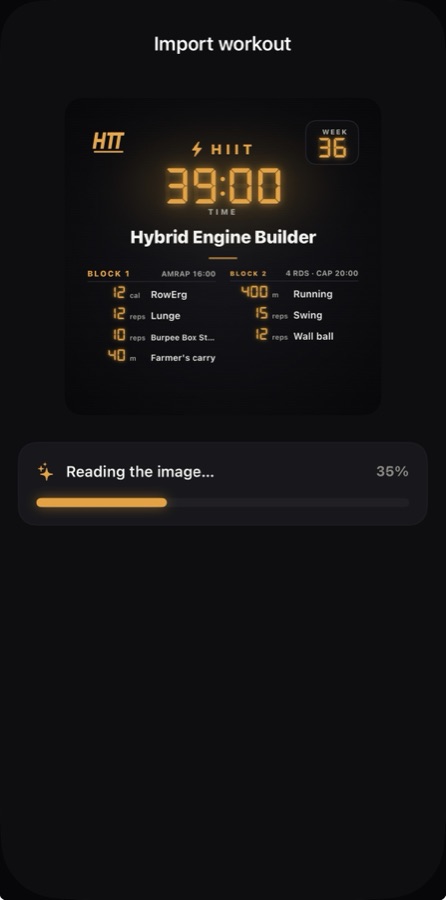
  • Camera, photo or screenshot — the whole workout is read in one shot.
  • Matched to the library, so every movement is a real, runnable exercise.
  • Straight into the timer — ready to run in a tap.
Importing a workout from a photo: the app reads the board and builds the blocks
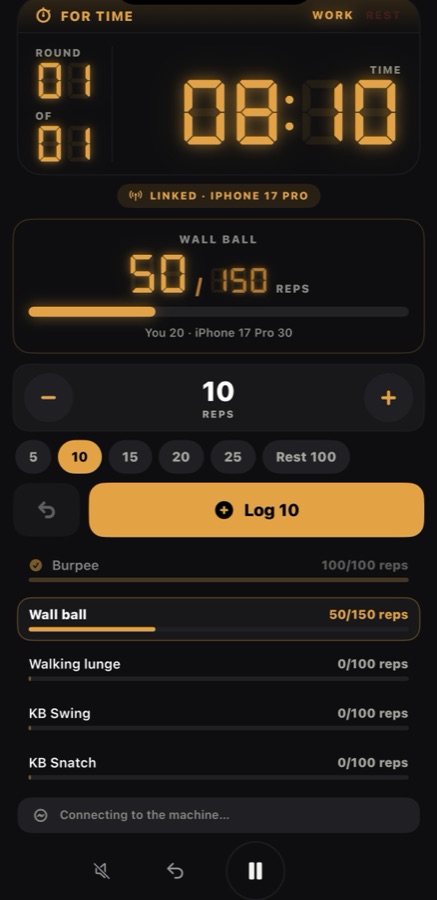
A partner workout running on a shared board with live totals
Partner workout

Two phones, one scoreboard

Bring a training partner. Your phones connect directly to each other — no account, no internet — and run the same workout on one shared clock. Reps logged on either phone land on the same board, and afterwards you both see who did what.

  • Phone-to-phone — works in a basement gym with no signal.
  • One shared board — log your reps in chunks with quick amount chips, and the totals update live on both screens.
  • One clock — both phones run on the host’s timer, down to the second.
  • Per-person split in the summary, next to the shared result.
Machines + timer

Your machine feeds the timer

Pair a Concept2 rower, SkiErg or bike, or an FTMS treadmill, over Bluetooth and run your workout on the timer as normal. The machine’s calories and distance are read straight off the monitor while you train — no numbers typed in, nothing to remember afterwards.
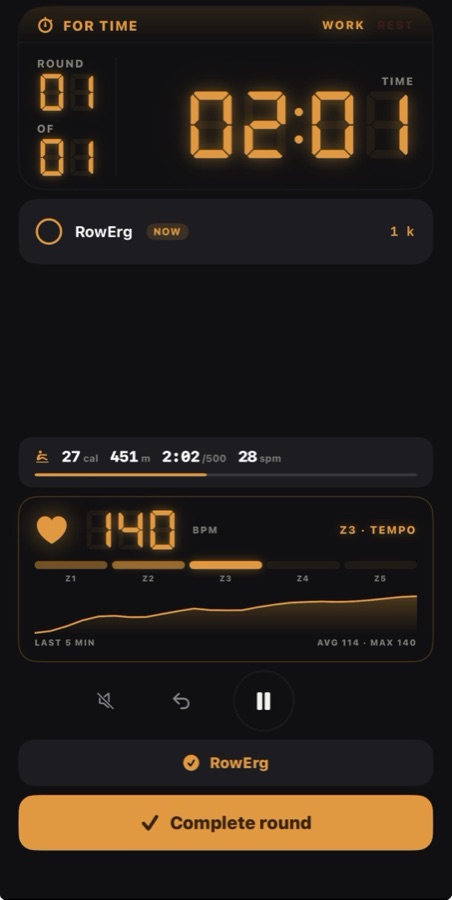
  • Concept2 and FTMS treadmills — the machine joins the session automatically.
  • Live calories & distance, read from the monitor round by round.
  • Calorie targets tick off themselves — a “10 cal” leg is closed by the machine’s own counter.
A workout running with a Concept2 machine connected, calories counted by the monitor
Three modalities, one training life

Most apps only see one of them

Strava sees the run. A lifting app sees the barbell. A box app sees the WOD. If you do all three, your training is split across apps that never talk to each other — and no single view tells you whether the whole thing is working. HTT treats them as one.

Strength

Your split, logged set by set

Full body, Upper/Lower, Push/Pull/Legs or your own. Log weight and reps per set, and estimated 1RM is tracked per lift over time.

WOD & HIIT

Every format, one timer

AMRAP, EMOM, for time and intervals — plus HIIT built from blocks, where each block runs its own format. Benchmark workouts included.

Cardio

Distance, duration or intervals

Run, bike, row, ski or swim. Build interval sessions leg by leg, mix machines within one session, and set pace or heart-rate zone targets.

New workout2 blocks
AMRAP
EMOM
FOR TIME
INTERVAL
CIRCUIT
CIRCUITBlock 1
Work
0:40+
Rest
0:20+
Rounds
4+
Round rest
1:00+
Wall Balls15 reps
Box Jumps12 reps
RowErg12 cal
+ Add exercise
Rest 2:00 · timed
EMOM12 min · 3 exercises
+ Add block
SaveStart
Build

Program a workout in under a minute

Pick a format, dial in the numbers, drop in the exercises. One block is a clean AMRAP, EMOM, for-time, interval or circuit — stack several and each block runs its own format, so warm-up, strength piece and metcon live in one session.

  • Format tiles first — the block swaps its fields to match AMRAP, EMOM, for time, interval or circuit.
  • Big steppers — tap, hold to accelerate, or just type the number.
  • Rest between blocks — a set time, or wait until you press the button.
  • Blocks collapse so you see the whole session — drag to reorder.
The timer

A gym clock that belongs on the wall

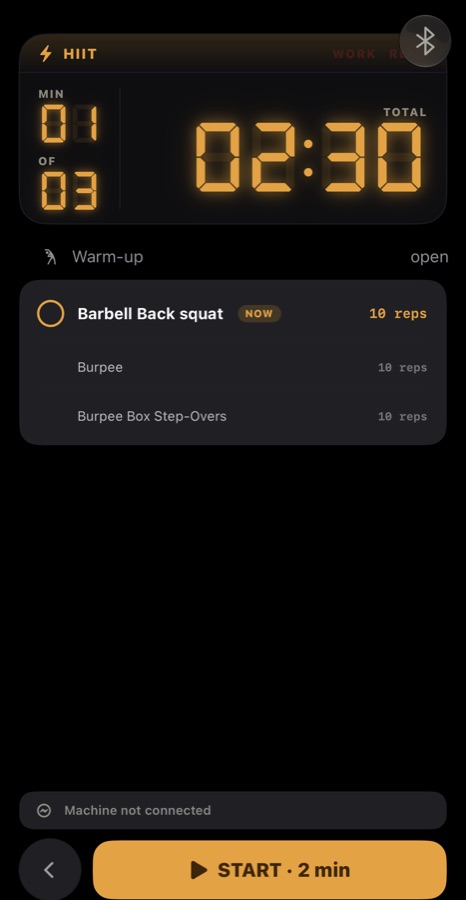
Big seven-segment digits you can read from across the floor, in amber or the classic red-and-blue pace clock. It keeps running on the lock screen and in the Dynamic Island, with audio cues on every phase change.

AMRAP
WORKREST
ROUND
03
TIME CAP
12:00
ROUND TIME
00:42

Tap a format to see its clock.

The gym clock on a HIIT workout, ready to start, with the round counter and warm-up below
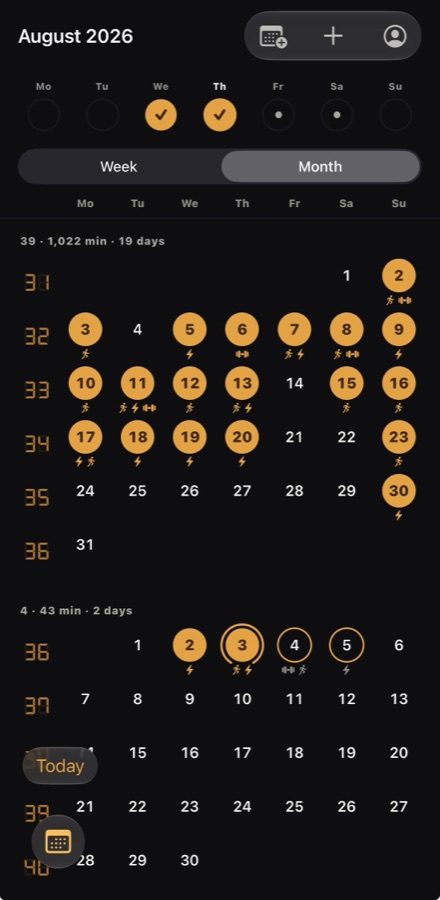
Rolling month calendar with week numbers in the margin
Plan

A week you can see, a month you can scroll

Plan day by day for the week, or scroll a continuous month calendar the way you already scroll your phone’s. Every day carries an icon per session, so a glance tells you what kind of training is on it.

  • Plan the week or the whole month from one planner.
  • Quick planning offers your own split and cardio types first — everything else is one tap away.
  • Several sessions per day, with a clear overview to swap or remove.
  • Week templates fill the empty days for you.
Progress

Am I actually getting better?

Pick the lifts, workouts and distances that matter to you and follow them over time. Then close the loop: give any of them a re-test cadence, and the card tells you when it’s due.
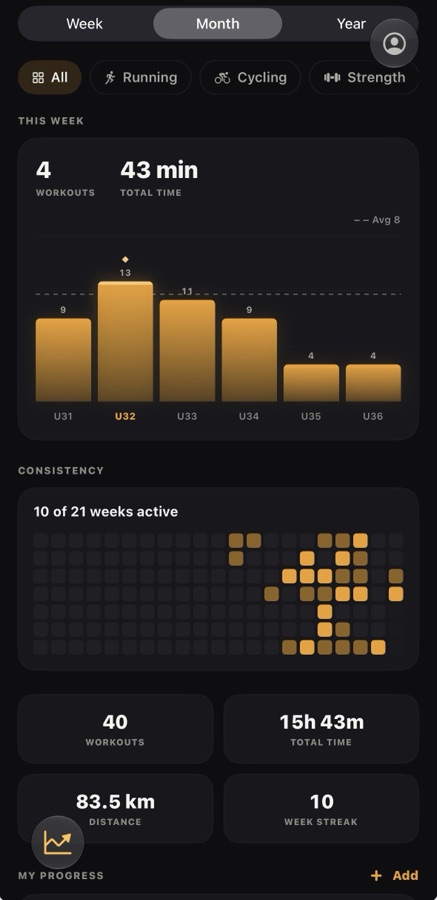
  • Test & re-test — every 4, 6, 8 or 12 weeks, per tracker.
  • Trends for estimated 1RM, rounds, times, pace and distance.
  • Volume and distribution across strength, HIIT and cardio.
  • Records and a consistency heatmap over the last 14 weeks.
Progress screen with trackers, re-test cadence and weekly bars
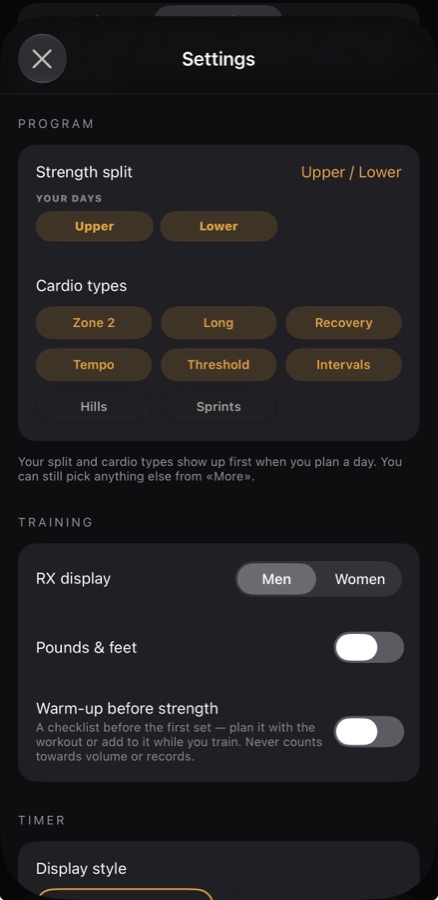
Your program in settings: strength split and the cardio sessions you actually do
Your program

Set it up once, and the app follows

Onboarding asks two things: how you train strength, and which cardio sessions you actually do. From then on, planning a day offers exactly those — Push, Pull and Legs if that’s your split; Zone 2, threshold and intervals if that’s your running. Change it any time in settings.

Your data

Recorded elsewhere, understood here

Apple Health

Runs and rides you record land in the app automatically, and workouts you finish here are written back to Health.

Suunto

Connect your account and workouts arrive with their FIT file, so pace and heart-rate curves are there immediately.

Merged sessions

An imported recording is matched to the app session it belongs to — including splitting one recording across several workouts.

Free & Pro

The timer is free

Everything you need to run a session costs nothing. Pro adds strength, hardware, AI, planning and unlimited workouts of your own.

Free
  • Every timer format (single block)
  • Up to three timers of your own
  • The workout of the week — in its active week
  • Benchmark workouts
  • History, records and progress
  • Apple Health import
  • Connect to HRA
  • All clock styles
Pro
  • Unlimited timers of your own
  • Multi-block HIIT sessions — combine formats
  • Strength training — build, run, log sets and PRs
  • Concept2 erg and FTMS treadmills — live calories and distance
  • Partner workouts — two phones, one shared scoreboard
  • AI: whiteboard, photo and screenshot import, dictation and analysis
  • The full exercise library — edit, muscle group, RX loads
  • Plan the week and month, move and reschedule
  • Any workout of the week, any time
  • Suunto and automatic session merge